terraform-containerization-bookstore-api
Containerization of Python Flask Bookstore Web API with MySQL using Docker Compose and Terraform


About | Case Study Details | Technologies | Requirements | Starting | License | Author
:dart: About
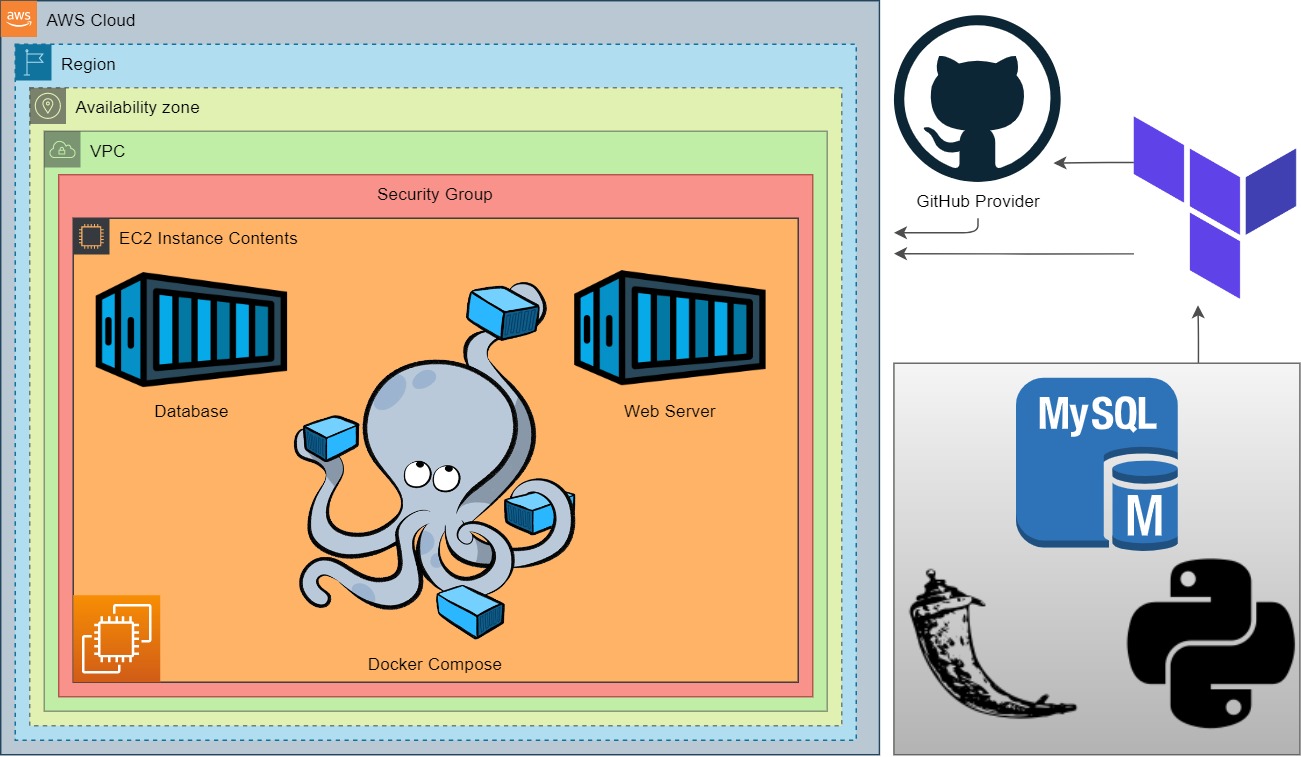
Bookstore Web API Application aims to create a bookstore web service using Docker to have the understanding to dockerization of an application. The application code is to be deployed as a RESTful web service with Flask using Dockerfile and Docker Compose on AWS Elastic Compute Cloud (EC2) Instance using Terraform.
Project Architecture
:sparkles: Case Study Details
-
Your team has started working on a project to create a
BookstoreApplication as Web Service. -
Software Developers in your team have already developed first version of
Bookstoreapplication. They have designed a database to keep book records with following fields.-
book_id: unique identifier for books, type is numeric.
-
title: title of the book, type is string.
-
author: author of the book. type is string.
-
is_sold: book availability status, type is boolean.
-
-
Your teammates also created the RESTful web service as given in Bookstore API using Python Flask Framework. Below table shows how the HTTP methods are designed to affect the given resources identified by URIs.
| HTTP Method | Action | Example |
|---|---|---|
GET |
Obtain information about a resource | http://[ec2-hostname]/books (retrieves list of all books) |
GET |
Obtain information about a resource | http://[ec2-hostname]/books/123 (retrieves book with id=123) |
POST |
Create a new resource | http://[ec2-hostname]/books (creates a new book, from data provided with the request) |
PUT |
Update a resource | http://[ec2-hostname]/books/123 (updates the book with id=123, from data provided with the request) |
DELETE |
Delete a resource | http://[ec2-hostname]/books/123 (delete the book with id=123) |
-
You are, as a cloud engineer, requested to deploy the app in the development environment on a Docker Machine on AWS EC2 Instance using Terraform to showcase your project. To do that you need to;
-
Get the app code from GitHub repo of your team.
-
Create docker image using the
Dockerfile. -
Deploy the app using
docker compose. To do so;-
Create a database service using MySQL.
-
Configure the app service to run on
port 80. -
Use a custom network for the services.
-
-
-
In the development environment, you can configure your Terraform config file using the followings,
-
The application should be created with new AWS resources.
-
The application should run on Amazon Linux 2 EC2 Instance
-
EC2 Instance type can be configured as
t2.micro. -
Instance launched by Terraform should be tagged
Web Server of Bookstore -
The Web Application should be accessible via web browser from anywhere.
-
The Application files should be downloaded from Github repo and deployed on EC2 Instance using user data script within Terraform configuration file.
-
Bookstore Web API URL should be given as output byTerraform, after the resources created.
-
:rocket: Technologies
The following tools were used in this project:
:white_check_mark: Requirements
Before starting :checkered_flag:, you need to have Git, Docker and Terraform installed on your machine.
:checkered_flag: Starting
# Clone this project
git clone https://github.com/devenes/terraform-containerization-bookstore-api

# Access
cd terraform-containerization-bookstore-api

# Initialize terraform
terraform init

# Apply terraform
terraform apply -auto-approve
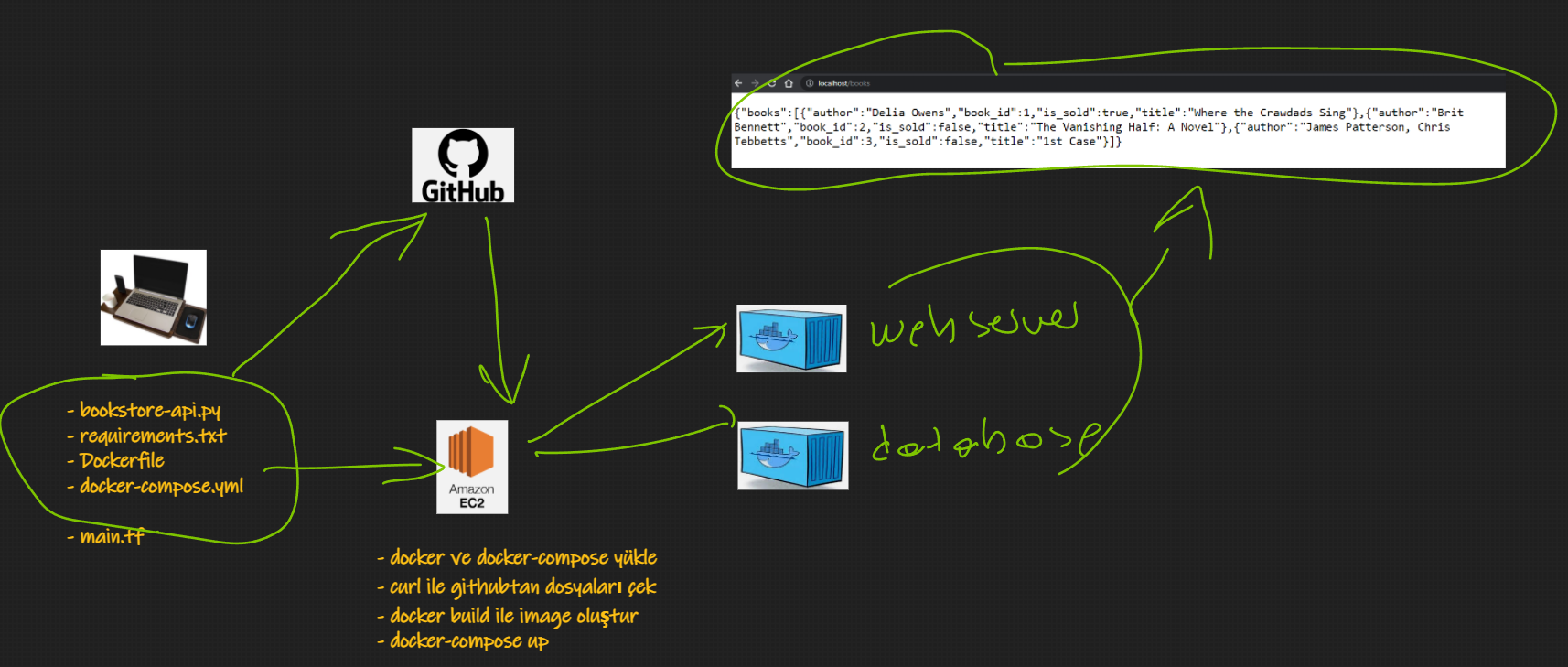
- To showcase your projects REST functions, use
curlcommand for each HTTP methods namely,GET,POST,PUT,DELETE.
GET
curl --request GET \
--url 'http://ec2-52-91-247-19.compute-1.amazonaws.com/books' \
--header 'content-type: application/json'
POST
curl --request POST \
--url 'http://ec2-52-91-247-19.compute-1.amazonaws.com/books' \
--header 'content-type: application/json' \
--data '{"author":"Paulo Coelho", "title":"The Alchemist", "is_sold":true}'
curl --request POST \
--url 'http://ec2-52-91-247-19.compute-1.amazonaws.com/books' \
--header 'content-type: application/json' \
--data '{"author":"Gabriel Garcia Marquez", "title":"One Hundred Years of Solitude", "is_sold":true}'
curl --request POST \
--url 'http://ec2-52-91-247-19.compute-1.amazonaws.com/books' \
--header 'content-type: application/json' \
--data '{"author":"Harper Lee", "title":"To Kill a Mockingbird", "is_sold":true}'
PUT
curl --request PUT \
--url 'http://ec2-52-91-247-19.compute-1.amazonaws.com/books/3' \
--header 'content-type: application/json' \
--data '{"author":"Jose Rodrigues dos Santos", "title":"A Formula de Deus", "is_sold":true}'
DELETE
curl --request DELETE \
--url 'http://ec2-52-91-247-19.compute-1.amazonaws.com/books/2' \
--header 'content-type: application/json'
Expected Outcome
-
API Service Output
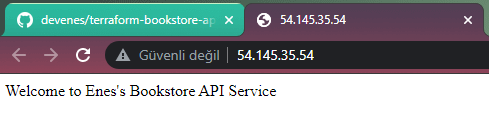
-
Terraform Outputs

At the end of the project, following topics are to be covered;
-
MySQL Database Configuration
-
Bash scripting
-
Docker Images
-
Docker Compose
-
AWS EC2 Service
-
AWS Security Group Configuration
-
Terraform Configuration with AWS
-
Git & Github for Version Control System
At the end of the project, you will be able to;
-
configure connection to the
MySQLdatabase. -
build a Docker image.
-
configure Docker Compose to run Python Flask app.
-
improve bash scripting skills using
user datasection in Terraform to install and setup web application on EC2 Instance -
configure AWS EC2 Instance and Security Groups.
-
configure Terraform files to use AWS Resources.
-
use git commands (push, pull, commit, add etc.) and Github as Version Control System.
-
run the web application on AWS EC2 instance using the GitHub repo as codebase.
Resources
:memo: License
This project is under license from MIT. For more details, see the LICENSE file.
Made with :heart: by devenes